Every game and practice from any team app with a calendar link, in one color-coded schedule. Leave alarms tell you when to load up and go. And with a free guest pass, Grandma makes every game too.
Early access is free: we're letting families in a few at a time on iPhone, through Apple's TestFlight app. Join the list and we'll email you an invite when your spot opens. At App Store launch (expected late November) you get 14 more days free, so it's free into mid-December. Android is on the way.
Early-access perk: a first-year discount on the yearly plan for iPhone when you start within 14 days of launch (details emailed at launch).
An invite when your spot opens and one email on launch day; updates only if you opt in.
Works with any team app that has a calendar link, including
TeamSnapSportsEngineGameChangerLeagueAppsHejaBANDEvery team picks its own app. Home Team pulls them all into one week, so you can see the double-booking before it happens.
Everything a sports family needs, and nothing it doesn't.
All your kids' teams in one place, color-coded, from any team app with a calendar link. Overlaps are flagged so you know when you need to be in two places at once.
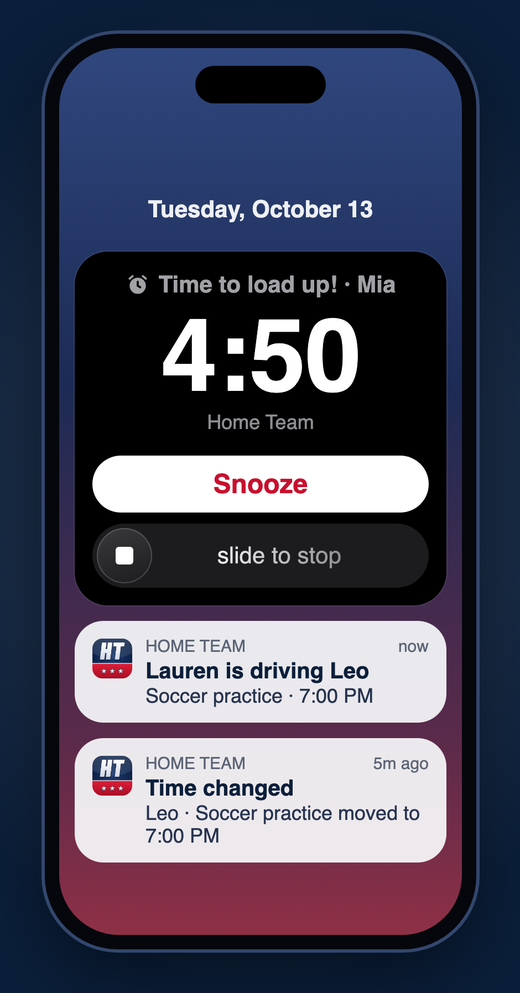
Leave-by times include the drive and the coach's "be there early." Alarms ring with a lock-screen countdown.
Tap "I'm driving" and the whole family knows who's taking each kid. No group text needed.
Get alerted when a game you're going to is cancelled, moved or rescheduled.
Up to 4 free guest passes. They'll never miss a game again.
No ads, no tracking, no account. We only read the calendar links you add.
No sign-up and no password. Just paste and play.
First names only. Pick a color for each.
Copy the calendar link from the team's app and tap Paste. Home Team fills in the rest.
Link your co-parent's phone, add the grandparents, and invite the other families.
Early families have been testing Home Team all season.
“Saturday mornings finally feel manageable again.”
“We stopped texting ‘who’s driving?’ mid-drive.”
“Grandma gets the schedule without another app.”

I built Home Team after one too many ‘wait, which field?’ texts in the carpool line. We’re a sports family too. Home Team started as the app we built for our own kitchen counter, so we’d know who’s driving, where the game is, and when to leave.
— Spencer, Front Porch Apps LLC
Both parents plus up to 4 free guests — up to 6 people.
Covers your whole household: up to 6 people
Early-access (iPhone): a first-year discount on the yearly plan when you start within 14 days of launch.Details emailed at launch.
Cancel anytime in the App Store.
Any team or sports app that offers a calendar subscription or calendar link (often called Sync, Subscribe or Export calendar). Popular examples include TeamSnap, SportsEngine, GameChanger, LeagueApps, Sports Connect and Bound, but if your app has a calendar link, it works.
Android is on the way. Join the list and we'll tell you when it's ready.
No sign-up and no password. Your schedule lives on your phone.
Send them a guest invite from the app. Guests follow along for free — up to 4 free guest passes per household.
Yes. Share sends a view-only copy of one team's games to another family. For grandparents and other relatives, use a free guest invite instead.
One subscription covers your whole Home Team — up to 6 people (both parents plus up to 4 free guests). $79.99/yr or $9.99/mo; same household coverage either way.
On the early-access list, if you start the yearly plan on iPhone within 14 days of launch, you get a first-year discount (details emailed at launch). The monthly plan stays $9.99/mo for the whole household.
Nope. You add the team's calendar link yourself.
Anytime, in your App Store subscriptions (iPhone Settings → your name → Subscriptions). More help is on the Support page.
Early-access perk: a first-year discount on the yearly plan for iPhone when you start within 14 days of launch (details emailed at launch).
An invite when your spot opens and one email on launch day; updates only if you opt in.